
How to take better photos on your phone
Learn how to sharpen your skills with our handy tips

|
Laura Ward Last updated 2 July 2026 |
Phone cameras are incredible these days, and there's a whole lot more they can do than auto mode lets on. Whether you're saving moments with your kids, building a creative portfolio, capturing content or just want your photos to feel more intentional – a few small tweaks can make a big difference.
Discover how to get more from the camera you already carry everywhere.
Lighting is everything

Light is the foundation of every great photo and understanding it is the most impactful thing you can do to improve your shots.
Smartphone cameras are extraordinary at processing light, but they work best when you give them something to work with. If your subject is standing in front of a bright window, your phone will adjust for that bright background, leaving them dark and underexposed.
The simple shift: position your subject so the light source is in front of them, not behind. Outside, let the sun light their face. Inside, turn them towards the window. That one change will do more for your photos than any filter or editing app.
Golden hour – the soft, warm window of light just after sunrise and just before sunset is worth experiencing with a camera in hand. It's naturally flattering and it makes any subject look their best. Landscape, portrait, street photography: golden hour improves all of it.
Start with a clean lens
 It's easy to overlook, but your lens lives in your pocket and your hand all day. A quick wipe before you shoot removes any fingerprints, dust or grease that could soften your images or add an unwanted haze. It takes two seconds and remembering to do it before each shot makes a real difference, especially in bright or backlit conditions.
Take control of camera focus and exposure
Tapping to focus is one of the quickest ways to bring intention to your shots. Rather than letting your phone decide, tap directly on the part of the scene you want sharp – your subject's eyes, a specific detail, the foreground of a landscape.
On iPhone, a long press locks focus and exposure together, so your settings stay put even if you reframe the shot. On Samsung and Android devices, an AF/AE lock option appears after tapping. Either way, once it's locked, you're in control.
Look out for the brightness slider that appears after you tap Slide it up or down to adjust the exposure before you shoot, dialling in exactly the look you want rather than correcting it afterwards.
Try the rule of thirds
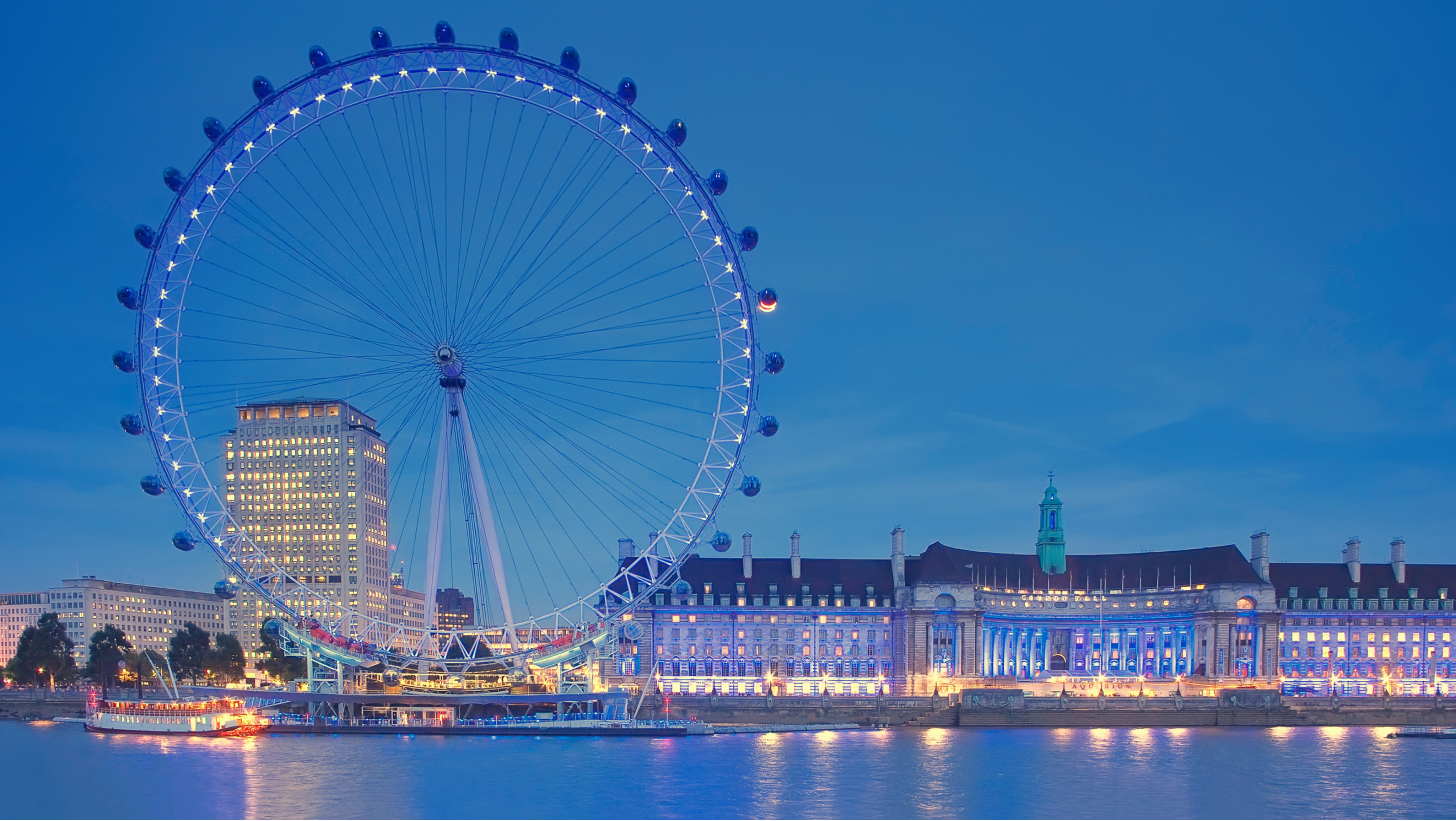
Turn on your camera grid (Settings > Camera on iPhone; Camera > Grid lines on Samsung) and your screen divides into nine equal sections. The rule of thirds is simply this: place your subject at one of the four intersection points rather than the centre of the frame.
It's a small compositional shift that gives your photos a natural, dynamic quality – the kind that draws the eye in and makes a scene feel considered rather than accidental. Try putting the horizon on the upper or lower line, or leaving space in the direction your subject is looking. Once you start seeing in thirds, you won't stop.
Get the most out of portrait mode

Portrait mode's blurred background effect – bokeh – is one of the most satisfying tools on a phone camera, and it's worth knowing how to use it at its best.
The sweet spot is usually one to two metres from your subject, with clear separation between them and the background. At that distance, the depth-of-field effect looks natural and intentional. The further you pull back, the more subtle it becomes; the closer you get, the more the edges of your subject start to blend into the blur.
If a shot isn't looking quite right in preview, particularly with loose hair or complex backgrounds like trees or foliage, standard photo mode with good light will often give you a cleaner, sharper result. Portrait mode is a powerful creative tool; it just works best when the conditions are right for it.
Explore what night mode can do
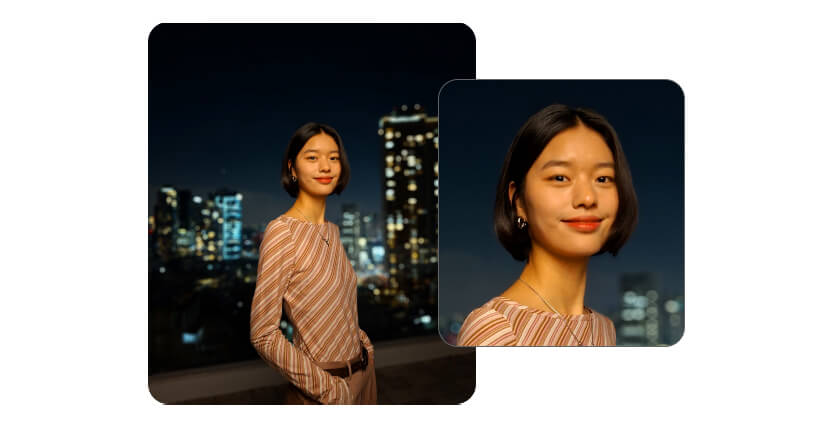 Night mode is one of the most impressive capabilities of a modern smartphone camera. It works by capturing multiple exposures in quick succession and combining them, pulling detail and colour out of low-light scenes that your eye can barely see.
To get the best from it, stability is key. The longer the exposure (the number of seconds your phone displays on screen), the more stillness you need. Prop the phone on a surface, lean it against something solid, or brace your elbows to reduce movement. The results – especially on iPhone 17 and the Google Pixel 10a can be stunning: rich colours, deep shadows and a level of detail that would have needed dedicated camera equipment not long ago.
Shoot more, then choose the best
One of the most freeing things about phone photography is that there's no cost to taking more shots. Burst mode, triggered by holding the shutter button on most phones, is brilliant for anything that moves: kids, pets, sport and candid moments. The sharpest frame, the best expression, the perfectly timed action shot is almost always somewhere in the burst.
For portraits, take ten or more frames while keeping the conversation going naturally. The photos people love most are rarely the stiff, posed ones, they're the ones caught mid-laugh or mid-sentence, full of life.
AI makes this even easier. iPhone's Best Take automatically selects the sharpest frame from a burst. Google Pixel's Top Shot picks the moment where faces are clearest and eyes are open. Samsung's Best Face goes further, letting you swap expressions across a group shot so everyone looks great in a single image – no more negotiating a retake.
Edit with a light touch

Great editing is invisible. The goal is to bring out what was already there, not to transform the image entirely.
The most effective adjustments are usually the most subtle: lifting the shadows slightly to reveal detail, pulling the highlights down to recover a bright sky or nudging the warmth to make skin tones feel balanced and natural. For landscapes and architecture, a touch of clarity and sharpness can add crispness and definition. For portraits, it's worth going easier on those same sliders.
Google Photos, Samsung Gallery and Apple Photos all have solid built-in tools that handle most situations beautifully. If you want to go deeper, Adobe’s Lightroom mobile app is free, powerful and well worth exploring as your skills develop.
Thinking about a camera upgrade?
If you've applied all the above and you're still finding your phone holds you back, particularly in low light, fast action or when you want more zoom, it might be time to look at what's out there.
The Samsung Galaxy S26 features a 50MP triple camera system with AI-powered photo and video editing built directly into the camera app. Google Pixel 10a delivers outstanding results under £500, with Google's image processing doing the heavy lifting to give you beautiful shots with minimal effort. And Apple iPhone 17 brings a dual 48MP system – wide and ultrawide – plus an 18MP front camera with Centre Stage, which keeps you in frame automatically whether you're moving or presenting.
Take a look at our Best phones for students guide for a breakdown of the top phones available right now, including camera quality. Or explore our full range of phone deals to find the right fit for your budget.
The best photo is the one you actually take
Technique matters, but presence matters more. Your phone is always with you and with a bit of thought about light, focus and composition, it's capable of producing photos that are worth keeping, sharing and framing in your home.
Ready for a phone that matches your creative flair? Explore our latest phones on O2 or check out our Phone buying guide for the best camera phones.
Related articles
quality(75))
Network
Digital packing list for travel
Stay connected across Europe this summer
quality(75))
Smart devices
Best streaming services
Which one is right for you?
quality(75))
Phones
Best phones for students
Cut through the noise and find the right phone for you